The complete field toolkit
The detail matters.
Keep it together.
One connected workflow for borehole intervals, groundwater, field observations and the reports they become.
Capture the ground, layer by layer.
Keep intervals, samples and field observations in one structured record. Record the detail while you are at the borehole, with the classifications your project uses.
- USCS and CSSC soil classifications
- Munsell colour, moisture and consistency
- Samples, recovery, groundwater and refusal
- Photos attached to the interval they describe
 Drillr
BH-04
Soil boring · 6.0 m · USCS
Brown · moist · medium dense
SS-01 / 0.5 mBrown · moist · stiff · trace gravel
SS-02 / 1.5 mGrey · wet · dense
Groundwater / 3.2 mGrey · low plasticity · firm
End of borehole / 6.0 mYour observation. A draft you control.
Record an interval in your own words. When you are online, Drillr transcribes the note and prepares structured fields for you to review, edit and accept.
- Record audio without a connection
- Interpretation happens when online
- Check uncertain fields before accepting
- The final decision stays with you
“One to two point five metres. Brown lean clay, moist, stiff. Trace gravel.”
Audio captured on device. Interpretation requires a connection.
Keep logging when the signal stops.
Core logging and voice recording stay available without signal. Records are saved on your device and can sync when connectivity returns.
- Sign in and prepare your project before site work
- Check the sync status before changing devices
- Voice interpretation and interactive maps need a connection
- Install from a supported browser for app-like access
Prepared for the field
- Core interval logging
- Available offline
- Photos & voice capture
- Saved on device
- Record synchronization
- When connected
- Voice interpretation
- When connected
- Interactive maps
- When connected
Sign in and prepare your project before going offline.
Explore the workflowA field record you can actually read.
See lithology, depths, colour and groundwater together. Generate a PDF borehole log from the same structured data, without re-entering the record.
- USCS and CSSC lithology patterns
- Depth ruler and Munsell colour column
- Sample and groundwater markers
- Graphical PDF reports with project metadata
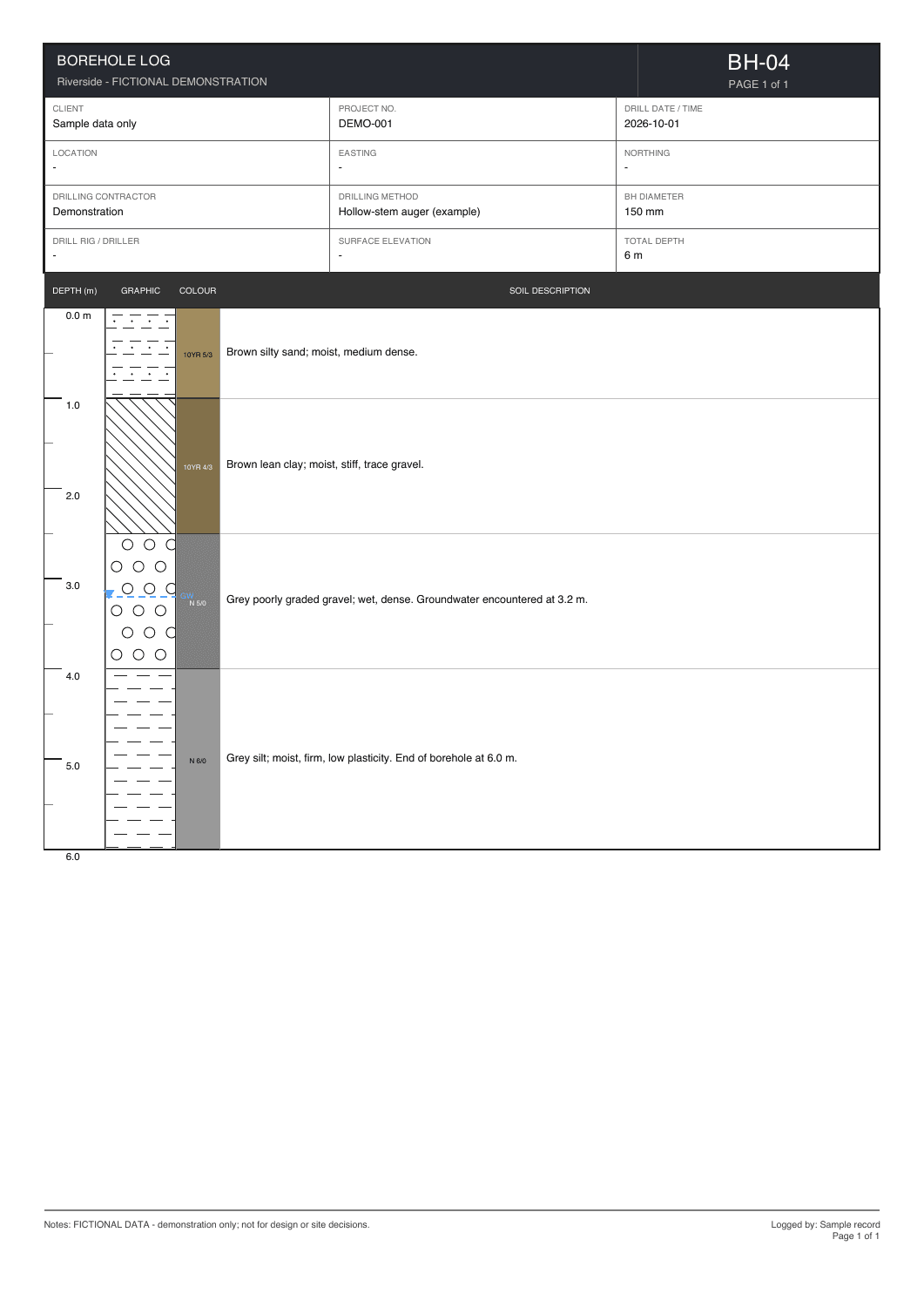
Fictional investigation data, for demonstration.
Fit the form to the investigation.
Start with a Geotechnical, Environmental, Mineral or Minimal template. Configure header and interval fields to fit the way your team records its work.
- Choose the fields your project needs
- Reorder and configure form fields
- Reuse a consistent vocabulary
- Include environmental chemistry measurements
Your project. Your form.
- Geotechnical
- Soil & sampling
- Environmental
- Chemistry & observations
- Mineral
- Investigation fields
- Minimal
- Just the essentials
- Custom
- Your configured fields
Start with a template, then configure the fields your team needs.
Explore the workflowRead across the whole investigation.
Place graphical logs side by side at a shared depth scale. Review sequences, groundwater and changes between boreholes in the same project.
- Compare multiple boreholes together
- Read layers at a common scale
- Review changes in the subsurface
- Keep the original logs close at hand
Illustrative view · example boreholes
Keep every record in its place.
Capture GPS coordinates, convert to UTM and record DLS locations. Open the interactive map when connected to see boreholes in their project context.
- GPS capture and UTM conversion
- Dominion Land Survey location entry
- Borehole locations and status on the map
- Interactive maps require connectivity
Every borehole, in context
- GPS
- Capture in the field
- UTM
- Convert coordinates
- DLS
- Record survey locations
- Project map
- Review borehole positions
- Structured exports
- Continue in your GIS tools
Location capture depends on device permissions. Maps require connectivity.
Explore the workflowFollow the record below the water table.
Capture well construction and groundwater observations alongside the investigation. Keep environmental measurements and monitoring records connected to the site.
- Well construction and completion details
- Groundwater readings and monitoring events
- EC, chloride and VOC interval measurements
- Graphical logs and data exports
One connected well record
- Construction
- Casing, screen & completion
- Groundwater
- Depth observations
- Monitoring
- Events & readings
- Chemistry
- EC, chloride & VOC
- Deliverables
- Graphical logs & exports
Keep construction details and environmental observations with the investigation.
Explore the workflowTake your data into the next step.
Generate the report or export your structured records for the tools you already use. Discuss scoped integrations when your organization needs a specific connection.
- PDF graphical borehole logs
- GRYD, Excel and CSV exports
- Coordinate and interval data for GIS workflows
- Custom integrations scoped with your team
Fictional investigation data, for demonstration.
Your next investigation
Start with one borehole.
See the difference.
3 days free. No credit card required.